Effective Coding Agents pt. 1 - The basics
My goal here is to compile a general guide to being effective and productive with coding agents — tools like Claude Code, Cursor, Windsurf, Cline, Aider, and others. While there are nuances across models and harnesses, the fundamentals are broadly the same.
If you are looking for the shortest, simplest, easiest way to start, Peter Steinberger has the best advice --
I just have fun and play and explore tech. There's no winning or failing. There's only learning.
- Peter Steinberger, creator of OpenClaw
Start Here: Setting Up Your Agent
Install and configure your preferred coding agent. Each has its own setup process. Follow the documentation for your tool. Most support terminal-based or IDE-integrated workflows. For now, the terminal-based agents are the most powerful in terms of raw features, but the Codex UI and Claude Code UI in the desktop apps are beggining to have a significant number of very valuable features.
Actually, Start Here: On usefulness and safety
Your coding agent becomes both more useful and more dangerous as you grant it more permissions and access to your machine. There are countless reports across every major coding agent of people losing their work and their databases. You have been warned.
Where should you actually start?
Hint!
Start at the point above this one. Read it again. Then come back here.
The best way to learn new tools like this is to try things and see what works and what breaks. In that spirit, the first thing to do is to pick a directory that you want to work in. If you're especially security-conscious, you can set up a new user on your machine, restrict access to a specific folder, and experiment. Another alternative is to use a virtual machine. Or do like me and don't save anything important on your machine, so if it breaks, nothing is lost except a bit of time.
So, in your terminal or IDE of choice, open your coding agent in a project directory. You'll need to authenticate - whether that's logging in, entering an API key, or connecting through your IDE.
Tools and Starters
Most coding agents suggest starter prompts like:
what does this project do?
add a hello world function to the main file
These are great because they show you a couple of different bits of functionality around the types of tools that your coding agent has available to it by default.
- Read File
- Grep/ripgrep
- Write File
- Edit File
In fact, why not ask your agent to list the tools it comes with by default? Note that the list is relatively short.
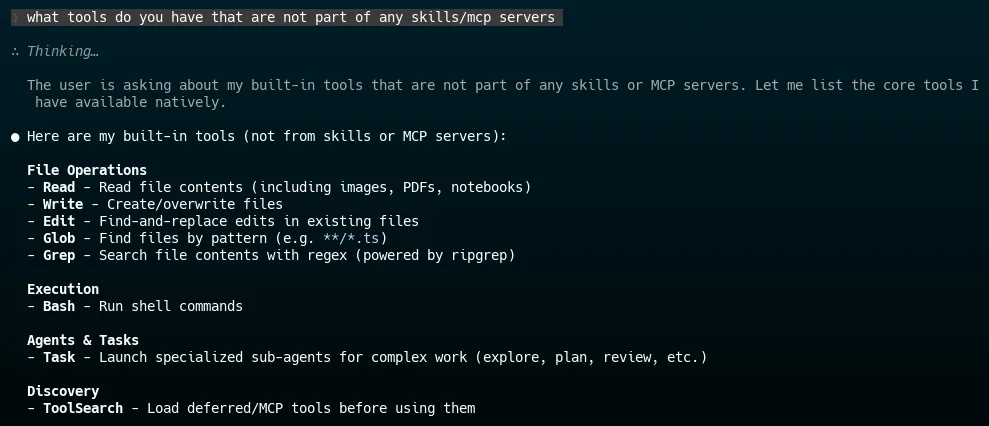
The most important thing to remember here is that most coding agents have access to your terminal or shell. That means they can do anything that you can do in that terminal. They can and will find ways to work around restrictions and roadblocks.
One thing you'll quickly notice is that it will ask for your permission to do things. This gets annoying rather swiftly and slows things down. At the beginning, though, it is important to read what the agent is trying to do so that when you apply more permissive settings, you'll know how and when to interrupt it.
Mindset
As with anything else, using coding agents is a skill that can be learned. No one starts out knowing how to use them effectively. Given the short time that they have been available, it's perfectly reasonable to argue that no one knows how to use them effectively.
For me, learning more effectively means immersing myself in the new thing. If you are able, do this with the coding agents. For every task, no matter how small and how unlikely you think it is to work, try to use your agent. If it fails, consider why and what might be done to resolve the issue.
This serves two purposes:
- You quickly get a sense of the edges of capability.
- You slowly build an intuition of how to prompt the agent successfully.
When troubleshooting, my first instinct is that the problem is me. I didn't provide enough context. I didn't ask the question the right way. I didn't provide detailed enough guidance or appropriate testing utilities. Because the action space (or the list of all possible things that can be done) is effectively infinite, it follows that there are a near-infinite number of ways to do things wrong. I'm doing my best to find them all.
Experiment
I'd like to end this first part with an encouragement to experiment. Have fun. If there's a project that you've been wanting to do, but haven't found the time, now is the time to do it!
Part 2 coming very soon.